Registration Guide · 2026
How to Register at Parimatch Canada — Step-by-Step Sign-Up Guide 2026
Opening a Parimatch account from Canada is a fairly quick process, but it is worth doing carefully. Small mistakes at the registration stage can create bigger problems later, especially when trying to verify the account or request a withdrawal.
Register Now →Parimatch Canada Registration Overview
Parimatch registration is completed online through the website. Players do not need to download a Canadian app to create an account. The same form works on desktop, laptop, tablet, iPhone, and Android devices.
In most cases, the process takes only a few minutes. A player enters personal details, chooses CAD as the account currency, creates a password, accepts the terms, and confirms contact details by email or phone.
Registration itself does not require a deposit. New users can usually create an account, look through the sportsbook, check the casino lobby, review payment options, and read bonus terms before adding funds. A deposit is only needed if the player decides to place real-money bets or activate a welcome offer.
The most important thing is accuracy. The information entered during sign-up should match the documents the player may later use for verification. Inaccurate details usually surface at withdrawal time, when KYC review pauses the payout until the mismatch is resolved.
⚠ Ontario Notice
Ontario has a separate regulated iGaming framework, and Parimatch is not registered under it. Ontario residents should use OLG or AGCO-registered operators.
How to Register at Parimatch Canada
The Parimatch sign-up process follows the usual online sportsbook format, but Canadian players should pay attention to a few specific fields: province, currency, phone number, and promo code.
Visit the Parimatch Website
Start by opening the Parimatch website in a secure browser. On desktop, any modern browser should work. On mobile, Safari is usually used on iPhone, while Chrome is common on Android.
Before entering personal details, check that the site connection is secure. The address bar should show HTTPS. This is a small step, but it saves trouble later because gambling brands are often copied by low-quality landing pages and fake bonus pages.
Because Parimatch is generally accessed through a mobile-optimized website rather than a Canadian app-store download, both desktop and mobile users begin registration in the browser.
Click "Sign Up" or "Register"
Look for the Sign Up or Register button on the homepage. It is usually placed near the top-right corner on desktop. On mobile, it may appear at the top of the screen or inside the menu.
Clicking the button opens the registration form. If the page asks for login details instead, switch to the registration tab.

Enter Personal Information
The form will ask for basic personal details. These usually include:
- Full legal name (use the same name that appears on government-issued ID)
- Date of birth
- Residential address
- Province or territory
- Postal code
- Email address
- Canadian mobile phone number
Do not use nicknames, initials, shortened names, or an old address. Parimatch may later request KYC verification before processing a withdrawal. If the account details do not match the documents, the account may be restricted until support reviews the mismatch.
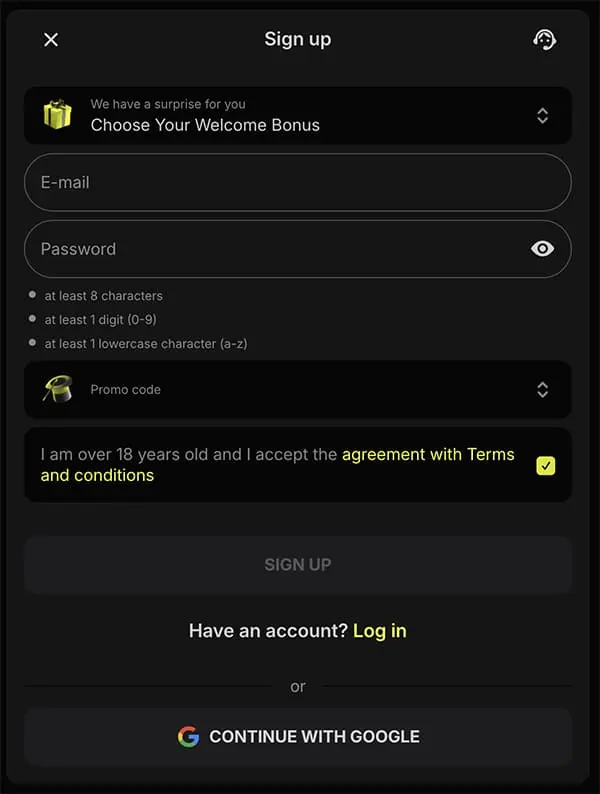
Select CAD as Your Currency
Selecting CAD keeps deposits, bets, limits, bonuses, and withdrawals in Canadian dollars. It also helps avoid currency conversion issues when using Canadian payment methods such as Interac e-Transfer, Visa, Mastercard, Skrill, Payz, or crypto converted into CAD value.
This is one of the easiest fields to overlook, and also one of the most annoying to fix later. Once the account is created, the base currency may not be easy to change.
Create a Secure Password
Choose a password that is unique to the Parimatch account. It should not be reused from email, banking, social media, or another betting site.
A stronger password usually includes uppercase letters,
lowercase letters, numbers, symbols, and enough length to
avoid easy guessing. Avoid names, birthdays, sports teams,
phone numbers, or simple patterns. Something like Hockey2026! may look acceptable, but it is not strong enough for an account
connected to payment details and identity documents.
Enter the Promo Code
The promo code field is usually located inside the registration form. Sometimes it is visible right away. In other versions of the form, it may be hidden behind a small link such as Promo Code, Bonus Code, or I have a code.
Parimatch Canada commonly uses two welcome-code paths: SPMATCH for the sportsbook welcome offer and CANADA for the casino welcome package. Players can review current Parimatch promo codes before deciding which one fits their play style.
This step should be done before submitting the form. In many cases, a welcome code cannot be added retroactively after registration. If the wrong code is entered, the player may not be able to switch from the sportsbook offer to the casino offer, or the other way around.

Accept the Terms and Confirm Legal Age
Before creating the account, the player must confirm that they are old enough to gamble in their province or territory and agree to the site's terms.
The terms are not exciting reading, but they are worth opening. Bonus rules, withdrawal limits, restricted locations, KYC requirements, duplicate-account rules, and payment conditions are usually explained there.
Verify Email or Phone
After submitting the registration form, Parimatch may send a verification code by SMS or a confirmation link by email. Enter the One-Time Password on the registration screen or click the confirmation link in the email.
If the code does not arrive immediately, wait about a minute before requesting another one. Sending multiple OTP requests too quickly can sometimes create confusion, especially on mobile networks.
Parimatch Canada Registration Requirements
Not every visitor can open a betting account. Parimatch applies basic requirements around age, location, identity, and duplicate accounts. Some checks happen during sign-up. Others may happen later, especially before the first withdrawal.
Legal Gambling Age in Canada
Canada does not use one national gambling age. The minimum age is set by province or territory:
- Alberta
- Manitoba
- Quebec
- Saskatchewan
- British Columbia
- New Brunswick
- Nova Scotia
- Prince Edward Island
- Newfoundland and Labrador
- Yukon
- Northwest Territories
- Nunavut
Players should enter their real date of birth during registration. If the date of birth does not match the ID used during verification, the account may be locked until the issue is reviewed.
Location Eligibility
Parimatch is an international online gambling brand, not a provincial lottery platform. Canadian gambling rules are managed by provinces and territories, which is why availability can differ depending on where the player lives.
⚠ No VPN Bypass
If the registration form blocks a province or asks for additional location confirmation, do not try to bypass it with a VPN. Location mismatches can lead to account restrictions and withdrawal problems later. In Ontario, private iGaming operators generally need provincial registration through the AGCO/iGaming Ontario framework, so players there should verify local status before attempting to sign up.
One Account Per Person
Parimatch uses a one-account-per-person policy. This is standard across online sportsbooks and casinos. Players should not create a second account to:
- claim another welcome bonus;
- use a different promo code;
- avoid a login problem;
- replace an old account;
- register with a new phone number or email.
Duplicate accounts can lead to bonus cancellation, account suspension, withdrawal delays, or closure of related accounts.
Accurate Account Information
The information entered during registration should be accurate from the beginning. That includes legal name, birth date, current address, province or territory, postal code, phone number, and email address. If the account information does not match the documents during KYC verification, the payout may be held until the player corrects or explains the discrepancy.
Parimatch Promo Code During Registration
The promo code is one of the most important registration fields for new players who want a welcome offer. It is also one of the easiest to miss.
Where to Enter the Promo Code
Look for a field labelled Promo Code, Bonus Code, I have a code, or Enter code. It is usually near the lower part of the registration form, before the final submit button. Enter the code before creating the account. Use capital letters and make sure there are no spaces before or after the code.
SPMATCH vs CANADA
The right code depends on what the player plans to use more: sportsbook or casino.
Sportsbook Welcome Offer
Intended for players who mainly want to bet on sports such as NHL, CFL, NBA, MLB, MLS, UFC, tennis, soccer, and esports. Sports bonuses usually involve wagering requirements based on odds and settled bets. If the listed rollover is 5x, it may be easier to understand than a casino rollover, but it still requires enough betting volume to clear.
Sports BettingCasino Welcome Package
Intended for players who plan to use slots, live roulette, live blackjack, baccarat, video poker, game-show titles, and software-based table games. Casino bonuses usually have higher wagering requirements. A 40x rollover is common in this part of the industry. Slots often contribute more toward wagering than blackjack, roulette, baccarat, or live dealer games.
Casino & SlotsCan You Change the Promo Code After Registration?
Usually, no. Promo codes must be entered during the initial sign-up process. If a player finishes registration without a code, or enters the wrong one, support may not be able to apply the offer later. If the bonus matters, do not submit the form until the correct code is accepted.
Registering on Mobile Devices
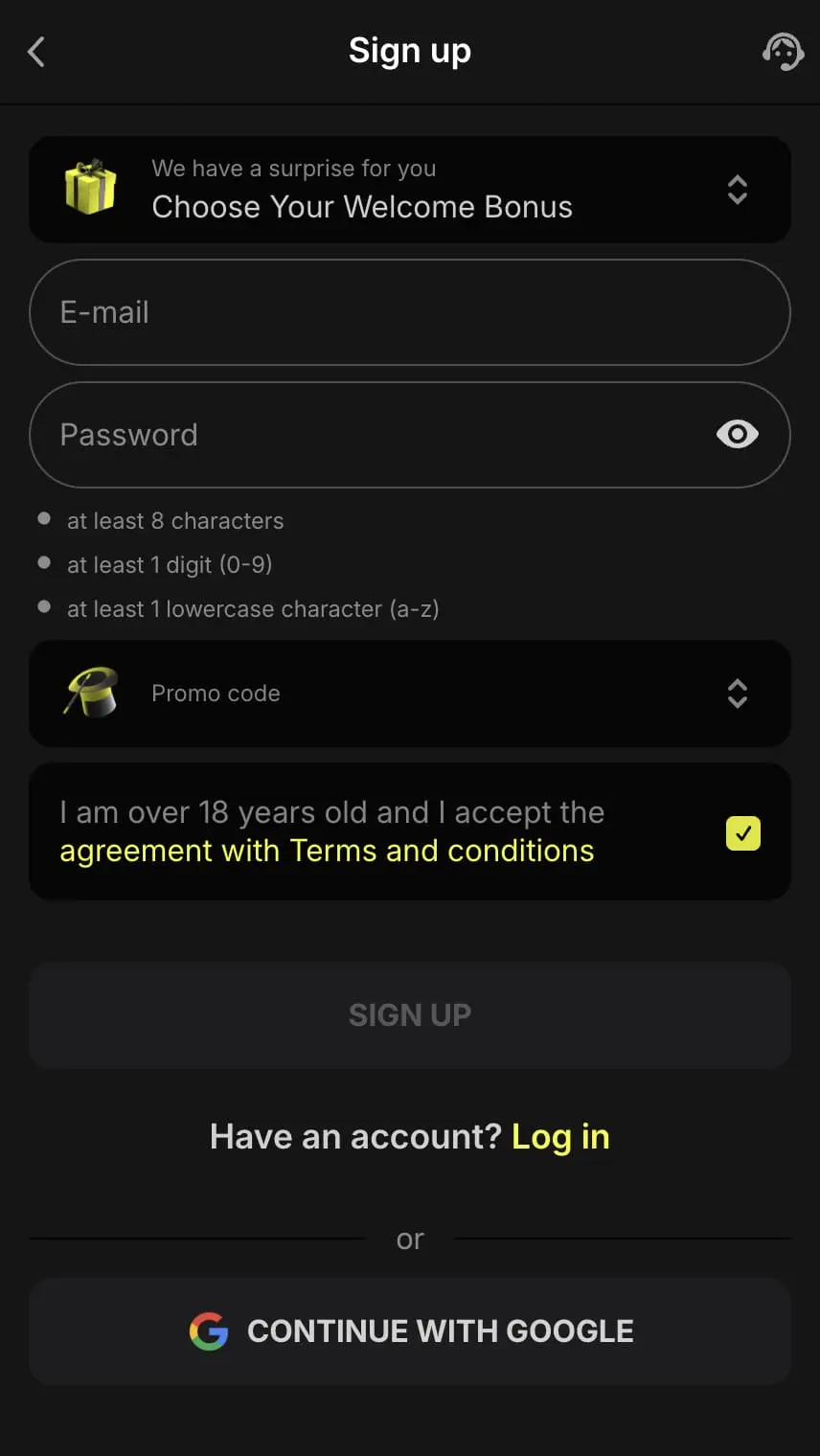
Many Canadian players register from a phone rather than a desktop computer. The mobile process is almost identical, but smaller screens make it easier to miss fields or accept autofill mistakes.
Using a Mobile Browser
Open the Parimatch site through Safari on iPhone or Chrome on Android. The registration form should adjust to the screen size and allow touch-friendly input. Before submitting, double-check all details since autofill can insert an old address, work email, or outdated phone number.
Adding a Home Screen Shortcut
After registration, mobile users can add the site to their home screen for quicker access. On iPhone, open the Parimatch website in Safari, tap the share icon, select Add to Home Screen, and confirm. On Android, open the Parimatch website in Chrome, tap the three-dot menu, select Add to Home screen, and confirm. This creates an app-like icon without downloading a full native app.
What Happens After Registration?
Creating the account is only the first step. After registration, the player can decide whether to deposit, activate a bonus, verify the account, or set limits first. A slower order is often better: check the terms, set limits, then deposit.
Make Your First Deposit
To place real-money bets, the account must be funded. Parimatch lists several payment options for Canadian users, including Interac e-Transfer, Visa, Mastercard, Skrill, Payz, and cryptocurrency. Interac is often the most familiar choice because it works through major banks and credit unions. The listed minimum deposit for common methods is usually $10 CAD.
Activate the Welcome Bonus
If SPMATCH or CANADA was entered during registration, the welcome offer should activate after a qualifying first deposit. The bonus may appear in a separate bonus balance rather than the regular cash balance. Before using the bonus, check the minimum deposit, wagering requirement, minimum odds for sports bets, game contribution rates for casino, expiry date, maximum bet while wagering, and any withdrawal restrictions.
Complete Account Verification
A player may not need to upload documents during registration. However, KYC verification is usually required before the first withdrawal. The account verification process may require government-issued photo ID, proof of address, payment-method confirmation, and additional documents for larger or unusual transactions. It is usually better to verify early instead of waiting until a withdrawal is pending.
Set Responsible Gambling Limits
After registration, players should review the responsible gambling tools in the account area before depositing. Useful controls may include deposit limits, loss limits, session reminders, time-outs, self-exclusion, and account closure tools. Setting limits early is practical, not symbolic.
Common Registration Problems and Solutions
Most Parimatch registration issues are simple to fix. The key rule is not to create a second account while trying to solve the first problem.
OTP Not Received
If the SMS code does not arrive, the cause may be mobile carrier delay, weak signal, incorrect phone number format, spam filtering, too many resend requests, or VoIP number rejection.
- Wait at least 60 seconds;
- check the phone number — remove spaces, dashes, brackets;
- do not add +1 if Canada is already selected;
- request the code again once.
If it still does not work, contact support rather than starting a new account.
Email Verification Issues
If the verification email does not arrive, check Spam, Junk, Promotions, Updates, and Trash folders. If registration has already started with the wrong email, contact support and ask how to correct it. Do not register again with a second email.
Phone Number Rejected
If the form rejects the phone number, try entering it as a plain 10-digit Canadian mobile number, for example 4165551234. Avoid spaces, dashes, brackets, country code if Canada is already selected, landline numbers, and VoIP numbers.
"Account Already Exists" Error
This message usually means the email, phone number, or personal details are already connected to an account. Do not open another account with different details. Use Forgot Password or contact live chat.
Promo Code Not Working
If SPMATCH or CANADA does not work, check spelling, capital letters, extra spaces, code expiry, selected country, province or territory, and whether the bonus is still available. If the code still fails, stop before submitting the registration form.
Location or Province Error
⚠ Do Not Use a VPN
If the form blocks registration based on location, do not use a VPN to bypass it. VPN use can create problems with account checks, payments, bonus eligibility, and withdrawals. Check the current terms or contact support if the province or territory appears to be blocked incorrectly.
Security During Registration
Parimatch states that registration pages use SSL encryption to protect information entered into the form. This helps secure names, addresses, passwords, phone numbers, and other account details during transmission.
Players should also take basic security steps:
- Register on a private internet connection;
- avoid public Wi-Fi when entering personal data;
- use a unique password not reused from other accounts;
- enable 2FA if available;
- upload documents only through the official account area.
Check how your data is protected before submitting personal documents.
Parimatch Registration Checklist
Before clicking the final registration button, check that all details are set up correctly. This takes less than a minute and prevents most registration problems.
- Legal name matches ID exactly
- Date of birth is correct
- Address is current
- Province or territory is accurate
- Email is spelled correctly
- Phone number is active
- CAD is selected as currency
- Password is unique and secure
- Promo code is entered correctly (SPMATCH or CANADA)
- Age requirement is met
- Terms and bonus rules have been reviewed
Frequently Asked Questions
1. How do I register at Parimatch Canada?
Open the Parimatch website, click Sign Up or Register, enter your personal details, choose CAD, create a password, add a promo code if needed, accept the terms, and verify your email or phone.
2. What information do I need to sign up?
Full legal name, date of birth, residential address, province or territory, postal code, email address, and a Canadian mobile phone number. These details should match the ID and proof of address used for later KYC.
3. Where do I enter the Parimatch promo code?
The promo code field sits inside the registration form, usually just above the final submit button. It may also be hidden behind a small link such as "I have a code". Enter SPMATCH for the sportsbook offer or CANADA for the casino offer, in capital letters, with no spaces before or after the code.
4. What is the minimum age for Parimatch in Canada?
The minimum age is 18 in Alberta, Manitoba, Quebec, and Saskatchewan, and 19 in the other provinces and territories.
5. Can players from Ontario register at Parimatch Canada?
Parimatch is not registered with the AGCO under Ontario's iGaming framework. Ontario residents should use OLG or AGCO-registered operators instead.
6. Is Parimatch registration free?
Yes. Creating an account does not require a registration fee. A deposit is only needed if the player decides to place real-money bets or activate a welcome offer.
7. How long does registration take?
A few minutes in most cases. It may take longer if the verification code is delayed or if the player stops to review bonus terms before submitting.
8. Do I need ID to register?
No — ID is usually only required before the first withdrawal, as part of KYC verification.
9. Can I register on my phone?
Yes. Registration works through a mobile browser on iPhone or Android. No app download is required, and users can add the site to the home screen as a shortcut after sign-up.
10. Why did I not receive the verification code?
Most often it is a carrier delay, an incorrect phone format, weak signal, spam filtering, or too many resend attempts in a row. Wait about 60 seconds, double-check the number, and request the code one more time. If it still does not arrive, contact support rather than starting a new account.
11. Can I change my promo code after registration?
Usually not. Promo codes should be entered before submitting the form. If the code does not work at sign-up, contact support before finishing registration rather than completing the account and asking for the bonus later.
12. What happens after I register?
The player can log in, review the sportsbook and casino, make a deposit if they choose, activate the selected bonus, complete KYC verification, and set responsible gambling limits in the account area.
13. Can I create another account if I made a mistake?
No. A second account can violate the one-account rule and lead to bonus cancellation or account closure. If there is a mistake, contact support or use account recovery instead.
Ready to Start?
Create Your Parimatch Account Today
Terms apply · Must be of legal gambling age · Gamble responsibly
Register Now →